








Skip to content
Apollo Group TV

Official Apollo Group TV

Apollo
Group TV:
Live TV and On-Demand Streaming Without a Cable Box

Apollo Group TV (Apollo TV for short) streams live channels and an on-demand library to the Fire TV stick, phone or computer you already have. You pay once for one to twelve months, follow a step-by-step install guide, and keep every bill and support reply in one dashboard.

Live Channels
22,000+
Movies & Shows
90,000+
Rating · 1 review
5.0/5
Start here

What Is Apollo Group TV?

Apollo Group TV, often shortened to Apollo TV, is an internet TV service. In place of a cable box on a monthly contract you get an app: live channels sorted by category and region, a library of movies and series to watch when you like, and one online account that holds your pack, payments and support history.

You decide how long you want access, from one month to a full year, and pay once. Nothing renews on its own. Our team switches the pack on, and if a device gives you trouble during setup, you keep replying in the same ticket until it works.

Pick one month or twelve, then watch on the screens you already own.

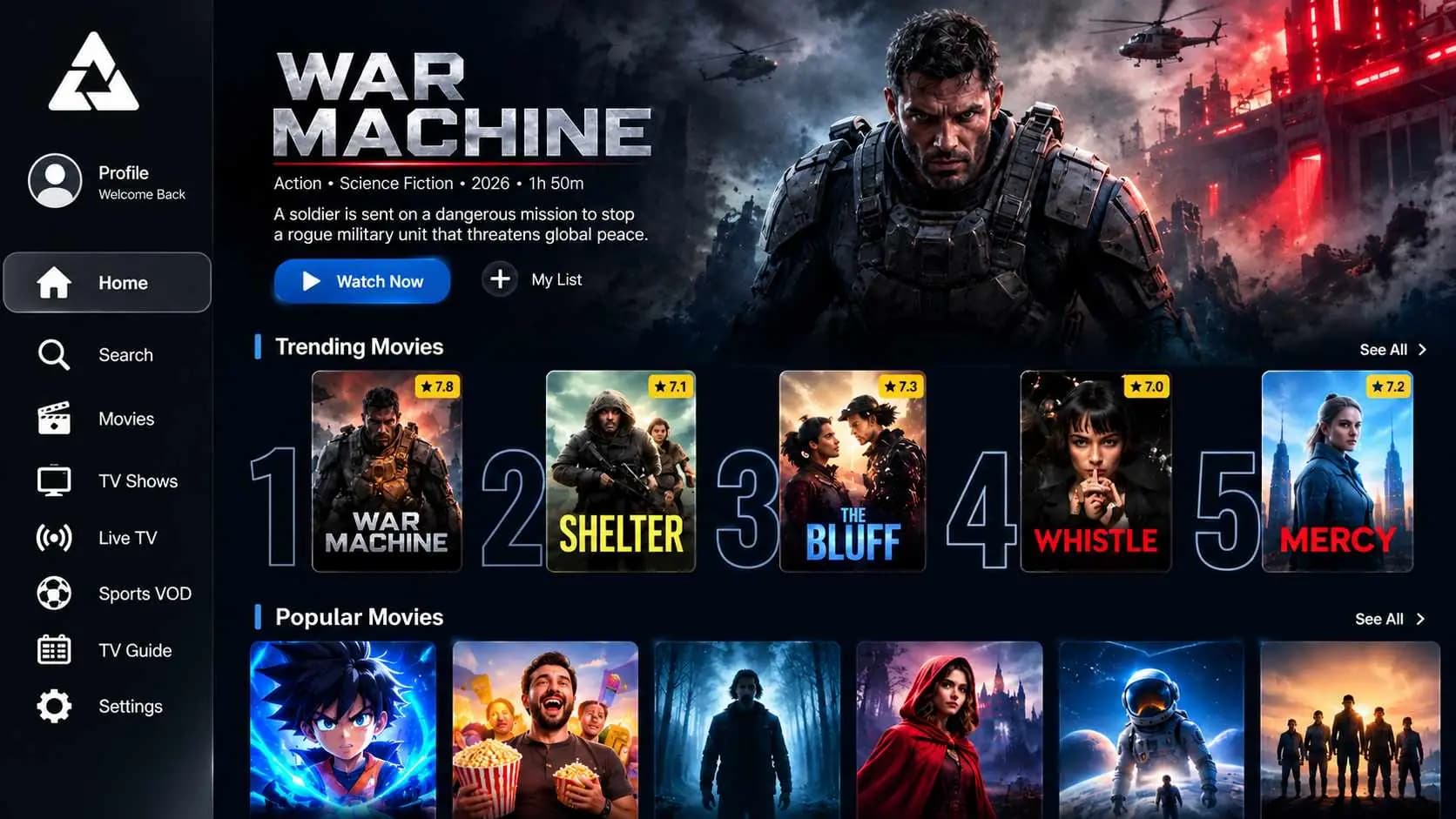
Apollo Group TV app home screen: a featured title, trending and popular movie rows, and a menu for Search, Movies, TV Shows, Live TV, Sports VOD and the TV Guide
The Apollo TV app home screen on a TV
Key facts

Apollo Group TV at a Glance

The essentials in one place: what the service is, how you pay, where it works and what isn't included.

Official website

This is the only address we use

The official address is apollogroupr.tv

Check the spelling before you sign in or pay. An extra letter, a hyphen or a different ending means it isn't us.

Four ways to check
Apollo Group TV key facts
Official websiteapollogroupr.tv
Also known asApollo TV
What it isAn internet TV (IPTV) service: live channels sorted by category and region, plus an on-demand library, watched in an app on your own device.
Price4 packs lasting 1 to 12 months, from $12.50 a month on the Platinum Pack. Compare packs
BillingOne payment per pack. Nothing renews automatically.
DevicesFire TV & Android TV, Android Phone & Tablet, macOS, Windows, iPhone & iPad, Apple TV
ActivationOur team activates your pack once payment is confirmed. Your login details then appear in My Account.
RefundsRequests within 7 days, under the Refund Policy.
SupportWritten replies in a support ticket from your dashboard, or through the contact page.
Not includedNetflix and other streaming services. Their accounts and apps are separate.
Pricing

Apollo Group TV Subscription Plans & Pricing

Every pack includes the same channels, library, device allowance and support. Only the length changes, and the longer the pack, the less each month costs. Full prices are shown before you choose.

  • Pay once · No automatic renewals
  • Save up to 50% · On longer packs
  • Fast activation · Confirmed by our team
  • Real support · Setup help on every pack

Available Apollo Group TV packs

Starter Pack

1 Month Access

$24.99

One-time payment · no automatic renewal

$24.99/mo

About $0.82 a day

One month of access — the easiest way to get started.

  • Up to 5 devices per account
  • Live channels and on-demand library
  • HD, Full HD and 4K where available
  • Setup guides for verified devices
  • Account dashboard with billing history
  • Ticket-based customer support
Get Starter

Refund policy · Activation confirmed by our team

Silver Pack

3 Months Access

Save 27%

$74.97 at the monthly rate

$54.99

One-time payment · no automatic renewal

$18.33/mo equivalent

About $0.60 a day

Three months of access at a lower monthly cost.

  • Up to 5 devices per account
  • Live channels and on-demand library
  • HD, Full HD and 4K where available
  • Setup guides for verified devices
  • Account dashboard with billing history
  • Ticket-based customer support
Get Silver

Refund policy · Activation confirmed by our team

Elite Pack

6 Months Access

Save 33%

$149.94 at the monthly rate

$99.99

One-time payment · no automatic renewal

$16.67/mo equivalent

About $0.55 a day

Six months of access for regular viewers.

  • Up to 5 devices per account
  • Live channels and on-demand library
  • HD, Full HD and 4K where available
  • Setup guides for verified devices
  • Account dashboard with billing history
  • Ticket-based customer support
Get Elite

Refund policy · Activation confirmed by our team

Best value

Platinum Pack

12 Months Access

Save 50%

$299.88 at the monthly rate

$149.99

One-time payment · no automatic renewal

$12.50/mo equivalent

About $0.41 a day

A full year of access with the lowest monthly cost.

  • Up to 5 devices per account
  • Live channels and on-demand library
  • HD, Full HD and 4K where available
  • Setup guides for verified devices
  • Account dashboard with billing history
  • Ticket-based customer support
Get Platinum

Refund policy · Activation confirmed by our team

Not sure which pack fits? You don't need a card to start. Our team confirms activation and payment options with you.

Included in every pack

What You Get with Apollo TV

Every pack has the same service, whichever length you choose. These are the parts customers rely on most.

  • HD, Full HD and 4K where available

    Channels carry a quality label, so you know what you're getting before you press play.

  • Pay once, no auto-renewal

    A pack covers a fixed number of days. When it ends, access stops and nothing is charged.

  • A guide for every device

    Fire TV, Android, Windows, Mac, iPhone, iPad and Apple TV each have their own install steps.

  • Activation by a real person

    Someone on our team turns your pack on and answers setup questions in writing.

Live sports

Watch Live Sports on Apollo Group TV

Follow every match in HD, Full HD and 4K where available

Catch the big game on the screens you already own. Apollo TV organizes sports channels by sport and by region, so you can go from football and basketball to fight night and race day in a few clicks. Picture quality depends on each channel's broadcast and your connection. Which sports channels and events you can watch depends on licensing in your region, and the channel guide always shows current listings.

  • Live SportsMajor events · Live coverage · Top competitions
  • UK SportsFootball · Rugby · Cricket · Tennis · Motorsport
  • US SportsAmerican football · Basketball · Baseball · Ice hockey · College sports
  • Canadian SportsIce hockey · Canadian football · Basketball · Soccer
  • European SportsFootball · Basketball · Cycling · Tennis · Racing
  • FootballDomestic leagues · Continental cups · International matches

Plus 12 more sport and region categories

Football·Basketball·Boxing·MMA·Tennis·Rugby·Cricket·Motorsport·Golf·Ice hockey·Baseball

Apps & devices

Apollo TV App: Supported Devices and Installation

The Apollo TV app runs on Fire TV and Android TV, Android phones and tablets, Windows and macOS. On iPhone, iPad and Apple TV you watch through the UHF player with the player login from your dashboard. Every device has its own install guide.

Device not listed? Ask us before subscribing and we'll tell you whether it works.

Supported devices

  • Amazon Fire TV Stick logo: install Apollo Group TV on FirestickFire TV Stick
  • Amazon Fire TV logo: Apollo Group TV app for Fire TV devicesFire TV
  • Android logo: Apollo TV app for Android phones, tablets and Android TVAndroid
  • Apple logo: watch Apollo Group TV on iPhone, iPad and Apple TViPhone & iPad
  • Microsoft Windows logo: stream Apollo Group TV on a Windows PC or laptopWindows PC

Fire TV, Android, Apple and Windows are trademarks of their respective owners and are shown only to indicate compatibility.

Your device

Choose Your Device to Set Up Apollo TV

Pick the screen you'll watch on to get its step-by-step guide. If your TV can't run the app directly, we'll show you what works instead.

Will the app install on my Fire TV?

Newer Fire TV models run Vega OS, which only installs Amazon Appstore apps. Check yours in under a minute.

  1. 1. On the Fire TV, open Settings > My Fire TV (Device & Software on Fire TV smart TVs) > About.
  2. 2. Look at the software version. What does it say?
Cut the cord

Apollo Group TV vs. Cable TV: How They Compare

Thinking about leaving cable? Here is how Apollo Group TV and a typical cable package differ on monthly cost, equipment, commitment and support.

Apollo Group TV compared with cable TV and other streaming services
FeatureApollo Group TVCable TVOther streaming
Monthly costApollo wins: From $12.50/moFalls short: Monthly bill plus add-on feesComparable: A monthly fee per service
Live channelsApollo wins: 22,000+Comparable: Fixed channel packagesFalls short: Mostly on-demand; live TV varies
Movies & showsApollo wins: 90,000+Falls short: Limited on-demandComparable: Large on-demand libraries
4K qualityApollo wins: Where availableFalls short: Often an extra costComparable: On some plans
TV guide (EPG)Apollo wins: Searchable channel guideComparable: On-screen guideComparable: Varies by service
EquipmentApollo wins: The app on your own deviceFalls short: Set-top box, often rentedComparable: The app on your own device
SupportApollo wins: Tickets with full reply historyComparable: Phone queuesComparable: Email or help center
ContractApollo wins: None. You pay once per packFalls short: Long-term contracts are commonComparable: Monthly, renews automatically
  • Apollo wins
  • Comparable
  • Falls short

Cable and streaming terms vary by provider and region. Those columns describe common arrangements, not any specific company.

How it works

How Apollo TV Works in Four Simple Steps

Four steps take you from a new account to your first channel. None of them needs an engineer, a contract or a home visit.

  1. 1

    Create your account

    Sign up with your email and confirm it with one click.

  2. 2

    Choose your pack

    Pick the access period that suits you and request activation.

  3. 3

    Get activated

    We confirm your pack and it shows as active in your dashboard.

  4. 4

    Start watching

    Install the Apollo TV app on your verified device and sign in.

Reviews

Apollo Group TV Reviews from Real Customers

What customers say after using Apollo Group TV. We publish critical reviews alongside positive ones, and we never pay for testimonials or invent reviewers.

Verified customer

Excellent Experience with Apollo Group TV

“Really enjoying Apollo Group TV! Great selection of channels, movies, and shows. Everything has been a pleasant experience so far. Highly recommended!”

erroauiNov 4, 2026
Trust & safety

Is Apollo Group TV Legal and Safe to Use?

Streaming TV over the internet, often called IPTV, is a mainstream and lawful technology. Whether a particular service is lawful depends on its permission to distribute what it offers. Our policy is to list only authorized, properly licensed content and to act on valid copyright notices.

Read the full explanation: Is Apollo Group TV legal? This is general information, not legal advice.

  • Published policies

    Our terms, privacy policy, refund policy and copyright process are public.

  • Official downloads only

    Install from the links in your dashboard, our setup guides or official app stores. Codes and files passed around online aren't from us.

  • Protect your account

    We never ask for your password. Watch out for lookalike sites that borrow the Apollo name.

Official website

How to Know You're on the Official Apollo Group TV Site

Lookalike sites copy the Apollo name to take payments. Four checks tell you you're in the right place before you pay.

How to spot a fake Apollo site
  • The address is apollogroupr.tv

    Type it yourself or use a bookmark. Sites with extra letters, hyphens or other endings aren't us.

  • You only pay through your own invoice

    Every invoice is created in your account and has a number starting with AGT-. Nobody from Apollo will ask you to pay by message or email.

  • Login details stay in My Account

    Your app login appears in My Account once your pack is active. We never send it by email or chat.

  • Support answers in your ticket

    Help comes through tickets in your dashboard or our contact page, so every reply is on record.

Guides

Apollo TV Setup and Help Guides

Step-by-step answers to the questions customers ask most, from installing the app to renewing your pack.

FAQ

Apollo Group TV FAQ: What People Ask Before Signing Up

Quick answers to the questions we hear most. The full FAQ covers billing, privacy and troubleshooting in more depth.

Still have a question?

Our team answers every message, usually with a written reply you can come back to.

Internet TV delivery is a lawful technology. What matters is whether the provider has rights to the content, and we list only authorized, properly licensed content. Our plain-English explanation goes further.

Everything you need to judge us is public: prices, terms, a privacy policy and a copyright process. Accounts use email verification, hashed passwords and session controls, and we never ask for your password.

Each pack is a single payment for a fixed period, from one month to a year, and longer packs cost less per month. The Plans page shows every current price with the cost per month.

Only on Fire TV and Android TV, where the app installs through the free Downloader app. The official code is in your dashboard under Apps & Guides, and codes posted elsewhere aren't ours. Other devices use a direct download or an app store, as the setup guides explain.

Install the free Downloader app, enter the official code from your dashboard and choose Install. The Fire TV & Android TV guide covers each step, including how to reveal the hidden Developer options menu.

Choose your pack from the dashboard and our team confirms the available payment options with you in a support ticket while online checkout is being set up. Never send card numbers by email or chat.

If the app won't load, check your internet connection and restart the device first. Then open a ticket or message us, and we'll confirm whether the problem is on our side.

Most problems come from an outdated app, the wrong login or a weak connection. Work through the troubleshooting guide; if it still fails, support can help.

Use your account email and password on the Sign in page and in the Apollo TV app. On iPhone, iPad and Apple TV, the UHF player uses the separate player login shown in your dashboard. Forgot your password? A reset link lasts 30 minutes.

Fire TV and Android TV, Android phones and tablets, Windows PCs and Macs run the Apollo TV app. iPhone, iPad and Apple TV use the UHF player. The App page links to a setup guide for each one.

We don't currently offer a free trial. The 1-month pack is the lowest-commitment way to start, and the Refund Policy explains how refund requests work.

Smooth playback depends mostly on your connection and device. A wired connection, an up-to-date app and fewer streams running at once make the biggest difference, and the troubleshooting guide covers the rest.

Each pack lists the number of devices it includes on the Plans page. An account belongs to one household; sharing access beyond your pack isn't allowed under our terms.

Customers can open a ticket from the dashboard. Anyone can send a message through the contact page.
Get started

Cut the Cord with Apollo Group TV This Week

Create your account in about a minute, choose a pack, and our team will get you watching on your own screens. Packs start from $12.50/mo, and longer packs save up to 50%.

  • One-time payment
  • No automatic renewal
  • No contracts
  • Activation by our team